
Introduction
What’s the Best Way to Track Jobs and Clients Without a Spreadsheet? This is a common challenge for modern service businesses. However, relying on spreadsheets often leads to confusion, lost data, and slow workflows.
Moreover, businesses today need faster systems that improve accuracy and visibility. Therefore, POS and job management systems offer a smarter and more reliable alternative. In this guide, we explore how you can manage jobs and clients efficiently without spreadsheets.
Why Spreadsheets Are No Longer Enough
Spreadsheets were once useful. However, they struggle to support growing businesses. Additionally, manual updates increase the risk of errors.
For example, duplicate entries, missing data, and outdated information are common problems. As a result, teams waste time fixing mistakes instead of growing the business.
What’s the Best Way to Track Jobs and Clients Without a Spreadsheet?
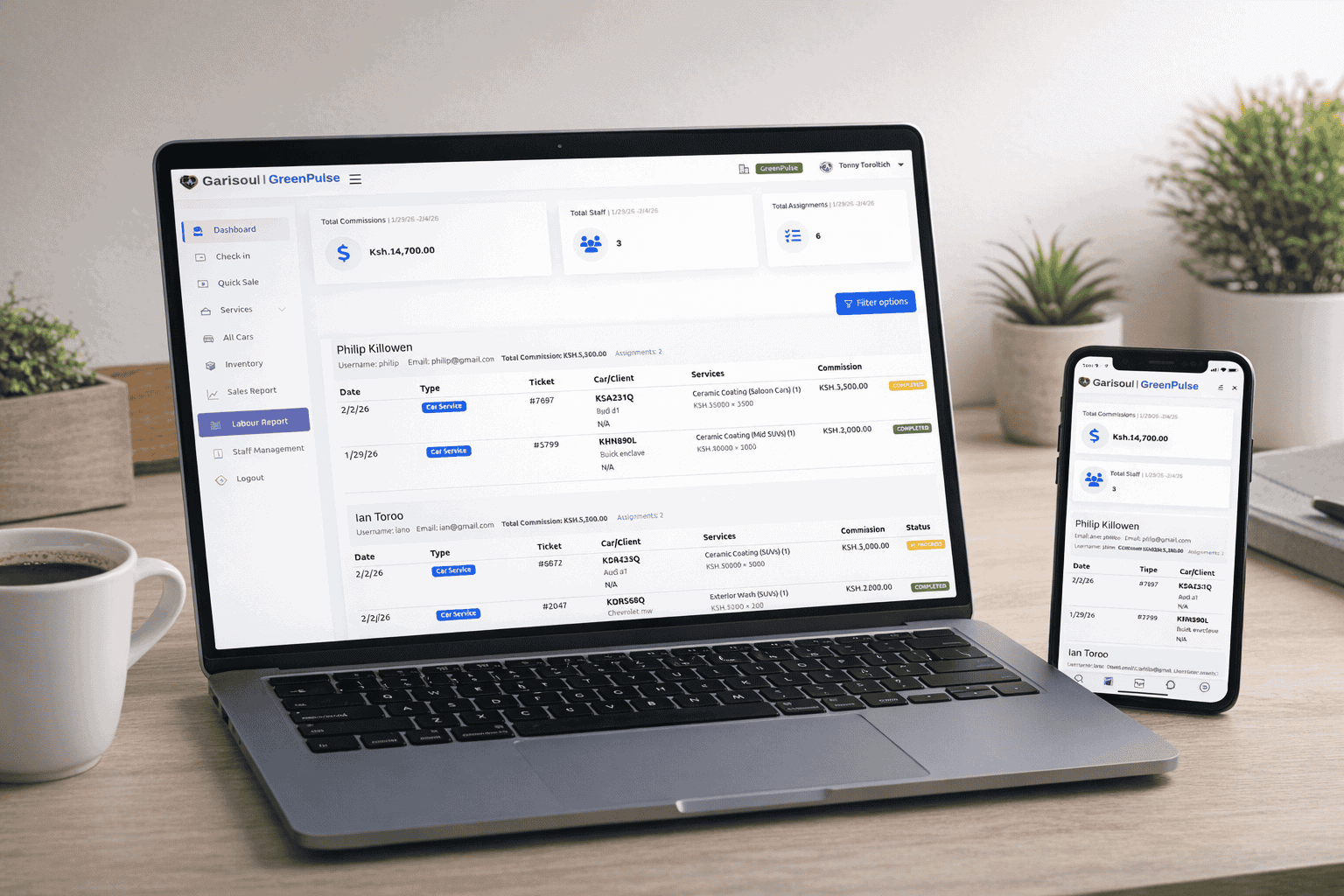
The best way is to use a modern POS or job management system. In fact, these systems centralize all your operations into one platform.
Moreover, they automate tracking, reduce errors, and improve communication. Therefore, businesses gain full control over jobs, clients, and workflows in real time.
Centralized Job and Client Management
A POS system stores all job and client data in one place. Consequently, you can access information instantly without searching through files.
Real-Time Updates
Additionally, every update reflects instantly across the system. For example, when a job status changes, all team members see it immediately.
Key Benefits of Moving Away from Spreadsheets
Switching to a digital system brings several advantages. Moreover, it improves productivity and reduces stress.
- Faster job tracking and updates
- Improved client communication
- Reduced human errors
- Better team collaboration
- Real-time reporting and insights
How POS Systems Improve Job Tracking
POS systems are not just for sales. However, they are powerful tools for managing jobs and clients efficiently.
1. Automated Job Assignment
Tasks can be assigned automatically to team members. Therefore, managers save time and improve workflow efficiency.
2. Client History Tracking
Additionally, all client interactions are recorded. As a result, businesses can offer personalized services easily.
3. Progress Monitoring
Moreover, job progress is updated in real time. This ensures transparency across the entire team.
Step-by-Step Workflow Without Spreadsheets
Understanding the workflow helps businesses transition smoothly. Here is how it works:
- Create client profiles in the system
- Log job requests or service orders
- Assign tasks to team members
- Track job progress in real time
- Complete and generate reports automatically
Advanced Features That Replace Spreadsheets
Cloud-Based Access
Because systems are cloud-based, you can access data anywhere. Therefore, remote teams stay connected easily.
Automated Reporting
Additionally, reports are generated automatically. This removes the need for manual calculations.
Client Communication Tools
Furthermore, built-in messaging tools improve communication with clients. As a result, response times improve significantly.
Why Businesses Should Upgrade Now
Modern businesses need speed and accuracy. However, spreadsheets slow down operations and increase risks.
Moreover, customers expect fast and reliable service. Therefore, using outdated tools can hurt business growth and reputation.
To upgrade your operations, explore solutions here: contact Garisoul POS experts.
Real-World Applications Across Industries
This system is not limited to one industry. Instead, it works across many service-based businesses.
- Garage and automotive services
- Car wash management systems
- Repair and maintenance businesses
- Cleaning and facility services
Additionally, industries like travel and healthcare also use similar systems. For example, you can explore operational systems at travel and service automation platforms and healthcare service management systems.
Common Problems Solved by Digital Tracking Systems
Spreadsheets create many operational challenges. However, POS systems solve them effectively.
- Eliminates duplicate data entries
- Prevents lost or missing client records
- Improves task coordination
- Reduces communication gaps
Therefore, businesses operate more smoothly and efficiently.
How Digital Systems Improve Business Growth
Efficient tracking directly impacts revenue and customer satisfaction. Moreover, it allows better decision-making.
For example, managers can identify high-performing services. Similarly, they can improve weak areas quickly.
Best Practices for Managing Jobs Without Spreadsheets
To maximize efficiency, businesses should follow structured practices. Therefore, operations remain smooth and scalable.
- Use centralized job tracking software
- Update job status regularly
- Train staff on system usage
- Monitor performance reports weekly
- Automate repetitive tasks
Future of Job and Client Tracking Systems
Technology is evolving rapidly. Moreover, AI-powered systems are changing how businesses operate.
As a result, future systems will predict job timelines and automate client communication. Therefore, manual tracking will become completely unnecessary.
Conclusion
So, What’s the Best Way to Track Jobs and Clients Without a Spreadsheet? The answer is clear—modern POS and job management systems.
Moreover, they improve accuracy, speed, and customer satisfaction. Therefore, businesses that upgrade today will stay ahead of the competition tomorrow.
Frequently Asked Questions (FAQ)
1. Can I manage jobs without spreadsheets?
Yes, POS systems and job management tools replace spreadsheets completely.
2. Are these systems suitable for small businesses?
Yes, small businesses benefit greatly from automation and improved organization.
3. Do I need technical skills to use them?
No, most systems are user-friendly and easy to learn.
4. Can I track clients and jobs in real time?
Yes, updates happen instantly across all devices.
5. What is the biggest advantage of switching from spreadsheets?
The biggest advantage is automation, which reduces errors and saves time.