

Automotive Inventory Management Software for Better Stock Control
Automotive businesses lose money when stock records are incomplete, parts go missing, or essential items run out without warning. Automotive inventory management software helps garages, workshops, car washes, tyre centres, and fleet companies control parts, products, suppliers, and purchases from one organised system.
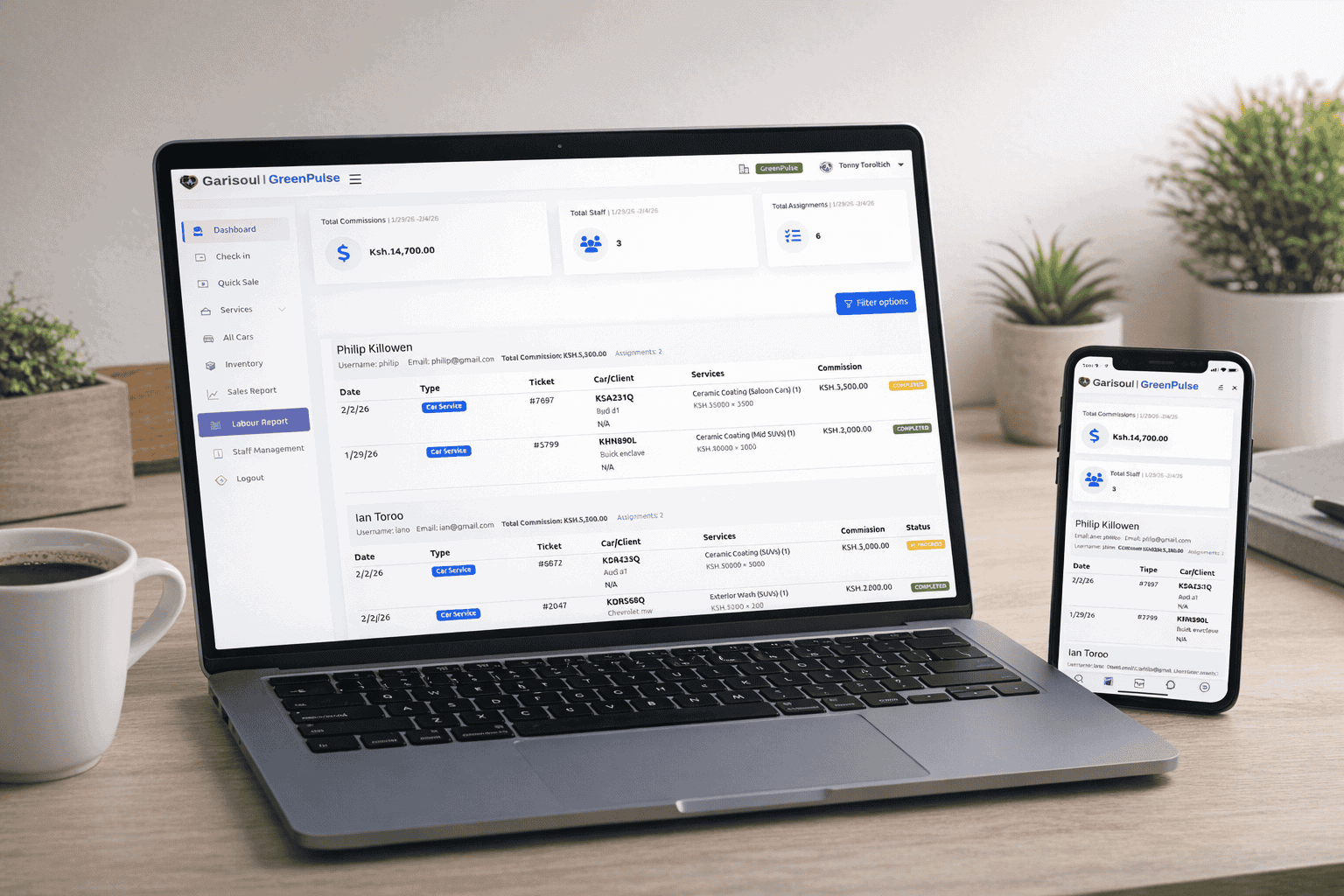
A workshop owner’s stock problem
James manages a busy workshop in Nairobi. His team serviced private vehicles and company fleets, but the workshop still relied on notebooks and spreadsheets to manage inventory. Mechanics requested parts verbally, while staff recorded some purchases on paper.
As the workshop became busier, small problems became expensive. Filters, oils, brake pads, and other parts went missing. Sometimes staff ordered items that were already available. At other times, a common part ran out just before a scheduled repair.
These problems caused delayed servicing and long customer queues. Some customers left after waiting too long. Others called repeatedly because the workshop could not provide a clear update. Manual receipts also made it difficult to match parts used with payments received.
James experienced cash leakage because some stock was used without being recorded. He also had forgotten customer records and poor reporting. Although he had skilled mechanics, he could not easily measure Mechanic Performance or confirm who used each part.
After adopting Garisoul, James began using Inventory Management, Digital Job Cards, Stock Alerts, Purchase Orders, Supplier Management, and Vehicle History. The team could connect every part to a job, customer, and vehicle. James could also review Sales Reports, Revenue Reports, and Business Analytics from one platform.
What is automotive inventory management software?
Automotive inventory management software is a digital system for tracking parts, products, tools, purchases, suppliers, and stock movement. It helps automotive businesses know what they have, what they need, what they bought, and what was used on each job.
A complete platform may connect inventory with POS, service records, customer information, and staff activity. For example, when a mechanic uses an oil filter, the system can record the item against a Digital Job Card and update the stock balance.
This creates a clearer link between the workshop and the sales desk. It also supports businesses that use Garage Management Software, Workshop Management Software, Auto Repair Shop Software, or Mechanic Workshop Software.
Why is it important?
Manual stock systems often fail because they depend on memory and consistent paperwork. In a busy workshop, staff may forget to record a part immediately. A supplier invoice may be misplaced. A manager may not know that a product has reached a low level until a customer is already waiting.
Automotive inventory management software provides better control. It can reduce stockouts, over-ordering, waste, and unexplained losses. Moreover, it gives owners a clearer view of the money tied up in parts and products.
Accurate inventory also improves customer trust. When staff can give a reliable update about a repair, explain the parts used, and provide a Digital Receipt, customers see a more professional business. Faster service can also improve repeat visits and referrals.
How does it work?
The process begins when staff create items in the inventory catalogue. Each item may include its name, category, supplier, cost, selling price, quantity, and reorder level. This creates a central record instead of separate notebooks.
When stock arrives, staff record the purchase through a Purchase Order or receiving process. Supplier Management keeps vendor details organised. If a product reaches its reorder level, Stock Alerts help the team act before it affects customer service.
When a customer brings in a vehicle, staff can create a Customer Database record and open a Digital Job Card. Inspection Forms can capture the vehicle’s condition and required work. Parts used during servicing are then linked to the job.
After payment, the POS creates a Digital Receipt. The system can save the work in the Vehicle History and update inventory. Managers can then use Business Analytics, Revenue Reports, and Sales Reports to review results.
Top features to look for
- Inventory Management: Organise parts, consumables, accessories, and other automotive products.
- Inventory Tracking: Monitor stock received, used, transferred, sold, and remaining.
- Stock Management: Set quantities, categories, prices, and reorder levels.
- Stock Alerts: Receive reminders before important items run out.
- Purchase Orders: Plan purchases and reduce unapproved or duplicate orders.
- Supplier Management: Keep supplier contacts, prices, and purchasing activity in one place.
- Digital Job Cards: Connect parts used with specific repairs and assigned staff.
- Inspection Forms: Record vehicle condition and recommended work before servicing.
- Vehicle History: Save previous repairs, parts, inspections, and service dates.
- POS and Digital Receipts: Process payments and provide clear records to customers.
- Mechanic Performance and Staff Tracking: Review job responsibility, progress, and completed work.
- Customer Database: Store customer contacts, vehicles, service history, and follow-up details.
- Sales Reports and Revenue Reports: Understand income, service demand, and product performance.
- Business Analytics: Use operational data to improve purchasing, prices, and planning.
- Multi-Branch Dashboard: Compare stock and performance across several locations.
- Cloud Hosting or Dedicated Server: Select an infrastructure option that fits your business needs.
- Software Updates and Technical Support: Keep the platform current and receive assistance when needed.
- Custom Branding: Present a consistent business identity on customer documents.
Benefits for automotive businesses
The first benefit is better visibility. Managers can see which items move quickly, which products remain unused, and which suppliers provide reliable service. Therefore, purchasing becomes more deliberate and less dependent on guesswork.
Second, the system can save time. Staff do not need to search through several files to confirm stock, previous work, or supplier details. Mechanics can receive clearer job instructions, while reception staff can prepare invoices more quickly.
Third, better records can protect money. Inventory Tracking helps reduce unexplained losses. Connected job and payment records can make cash leakage easier to investigate. Although software cannot replace proper controls, it gives managers stronger information for daily checks.
Finally, the system supports growth. A small garage can begin with basic Stock Management and later add Vehicle Service Tracking, staff reports, multiple users, and branch controls.
Manual systems versus digital inventory control
| Business area | Manual system | Garisoul approach |
|---|---|---|
| Stock levels | Staff count items irregularly. | Inventory Tracking shows current stock movement. |
| Purchasing | Orders depend on memory or verbal requests. | Purchase Orders and Stock Alerts support planning. |
| Parts usage | Parts may not be linked to a specific job. | Digital Job Cards connect items to repairs. |
| Customer records | Vehicle details can be lost or forgotten. | Customer Database and Vehicle History keep records organised. |
| Reporting | Reports take time to prepare. | Revenue Reports and Business Analytics provide faster insight. |
Who needs this software?
Garages need automotive inventory management software to control parts, oils, tools, and workshop supplies. Workshops may also need Workshop Management Software, Workshop Management System tools, Digital Job Cards, Inspection Forms, and Mechanic Performance reporting.
Car washes can use Car Wash Management Software to manage cleaning products and accessories. A Car Wash POS System or Car Wash POS Kenya solution may connect services, sales, customer records, and stock.
Tyre centres need Stock Management for different brands, sizes, and product categories. Fleet companies can use Vehicle Service Management Software to plan maintenance across many vehicles. As a result, the same platform can support a broad range of automotive operations.
Buying guide
Start by reviewing your current stock process. Identify where losses, delays, and errors occur. Are purchases approved? Are parts linked to jobs? Can staff see reorder levels? Do managers receive regular reports?
Next, check whether the software connects inventory with service management, POS, customers, and staff. A separate inventory tool may not be enough if your business also needs invoices, Vehicle History, Digital Receipts, or job tracking.
Also, ask about onboarding, data security, user permissions, training, support, updates, and future growth. Choose a system your team can use every day. The best software is not always the one with the longest feature list. It is the one that improves your real workflows.
Garisoul pricing and value
Cloud Starter costs KES 9,000 per quarter, with one-time onboarding of KES 7,999. It suits a car wash, tyre centre, startup, or small garage that wants to organise stock and basic operations without a large upfront licence investment.
The Business Licence costs KES 59,999 once. It suits multi-branch businesses, workshops, fleet companies, and established garages that need a long-term operating platform. It also includes an Annual Managed Service fee of KES 12,000 per year and one-time onboarding of KES 9,999.
Think about value rather than price alone. Better stock control can reduce waste. Faster purchasing can prevent service delays. Accurate job records can support billing, while reports can reveal profitable products and services. Review the available packages on the Garisoul pricing page.
Why choose Garisoul?
Garisoul connects Inventory Management Software with wider Business Management Software features. You can manage stock, suppliers, jobs, customers, payments, staff, and reports from one platform.
The system can grow with your business. You may begin with one workshop and later add branches, users, services, vehicles, or more detailed reporting. Cloud Hosting, Dedicated Server options, Software Updates, Technical Support, Custom Branding, and a Multi-Branch Dashboard can support that expansion.
Garisoul focuses on practical Business Automation. To discuss your needs, visit the Garisoul contact page or learn more on the Garisoul website. You can also explore Spot On Vacations and NUR Fertility for other service-focused business examples.
Common mistakes to avoid
- Choosing software only because it has the lowest price.
- Buying an inventory tool that does not connect with POS or job management.
- Failing to set user permissions for purchases, refunds, edits, and stock adjustments.
- Ignoring onboarding, staff training, Software Updates, and Technical Support.
- Not cleaning old inventory data before moving it into a new system.
- Failing to check whether the system supports additional branches and users.
- Keeping manual records indefinitely instead of creating a clear digital process.
Conclusion
Automotive inventory management software helps businesses reduce stock losses, prevent stockouts, improve purchasing, and connect parts with customer jobs. It also supports better reporting, faster service, and stronger customer trust.
Implementation time depends on your business size, existing data, number of users, and chosen features. A small garage can begin with inventory, customers, jobs, and POS. Larger workshops and fleet companies may need more time for data preparation, training, and branch setup.
When used consistently, Garisoul can become the foundation for stronger Inventory Management, Service Management Software, and Business Automation. It helps replace guesswork with organised information while giving your automotive business room to grow.
Frequently asked questions
What is automotive inventory management software?
Automotive inventory management software tracks parts, products, tools, suppliers, purchases, and stock usage. It can connect with Digital Job Cards, POS, Vehicle History, and customer records. This helps garages and workshops know what they have, what they need, and which job used each item.
Who needs automotive inventory management software?
Garages, workshops, car washes, tyre centres, auto repair shops, and fleet companies can benefit from this software. A small garage may need Inventory Tracking and Stock Alerts, while a larger business may require Multi-Branch Management, Supplier Management, Purchase Orders, and detailed Business Analytics.
How much does Garisoul software cost?
Garisoul Cloud Starter costs KES 9,000 per quarter, plus one-time onboarding of KES 7,999. The Business Licence costs KES 59,999 once, with an Annual Managed Service fee of KES 12,000 and onboarding of KES 9,999. The best option depends on your business size, branches, users, and infrastructure needs.
Can the software prevent stockouts?
It can help prevent stockouts by recording current quantities and using Stock Alerts. Purchase Orders can then support timely reordering. However, accurate results depend on staff recording stock received, transferred, sold, and used. Good user permissions and regular checks are also important for reliable Stock Management.
Can inventory be linked to vehicle repairs?
Yes. Digital Job Cards can connect parts and products to specific repair jobs. Inspection Forms record required work, while Vehicle History stores completed services and parts used. This gives workshops a clearer record for billing, customer communication, future servicing, and Vehicle Service Tracking.
Can this software support multiple branches?
Yes. A Multi-Branch Dashboard can help managers compare stock, sales, and performance across locations. Garisoul can support growth from one workshop to multiple branches. Before implementation, define how stock transfers, purchasing, user access, reporting, and branch-level approvals should work.
How long does implementation take?
Implementation depends on the number of users, branches, items, and existing records. A small business can start with its main inventory, suppliers, customers, jobs, and POS. Larger businesses may need additional time for data preparation, workflow design, onboarding, staff training, and testing.
Is automotive inventory software worth the investment?
It can be worthwhile when manual records cause missing inventory, delayed servicing, over-ordering, cash leakage, or poor reporting. The software can save staff time, improve purchasing, support accountability, and protect revenue. Compare the cost with the value of fewer losses, faster work, better customer trust, and future business growth.